Parental control app for iPhone and AndroidLess screen. More family.
Lock your child's phone in one tap, set daily limits and bedtimes, and see where they are. All from your own phone.
See how it works MIND THRIVEWanderzoo
Tap Lock Emma's phone now to see it happen
Every rule, one at a time.
The cards from the app's Controls tab. Try each one.
App Rules
Pick the apps that stay blocked. Changes reach their phone in seconds.
- Block any app
- Unblock any time
On Emma's phoneA blocked app shows a calm "TikTok is resting" screen.
Tap a tile to lock it.
Two ways to set time.
For the whole phone, or for one app.
3h 54m used today
Daily Limit
A daily budget for the whole phone. When it runs out, apps pause until tomorrow.
- A limit per child
- Resets every morning
On Emma's phoneThey see the time left, with a heads up before it ends.
YouTube
42m used today
App Limits
Give one app its own time, like 1 hour of YouTube.
- Pauses only that app
- Works with the Daily Limit
On Emma's phoneOnly that app pauses.
Schedules
Set Bedtime and School once. Timfy turns them on and off every day.
- Bedtime, School, Homework or Dinner
- Pause one for up to an hour
On Emma's phoneApps rest until the schedule ends.
What they open, and how often.
Block sites, and give the apps that pull them back only a few opens a day.
Websites
Block a site once and it stays blocked.
- Up to 50 sites, subdomains too
- Remove one any time
On Emma's phoneA blocked site shows a calm screen.
App Opens
Give an app only a few opens a day, like 5 opens of 5 minutes each.
- 1 to 50 opens a day
- Each open lasts 1 to 30 min
On Emma's phoneThey see how many opens are left today.
A calm stop, not a dead end.
A way to ask you, and something good to do.
Ask for more time
They tap Ask for more time. You answer with one tap.
- Arrives as a notification
- Extra time starts at once
On Emma's phoneExtra time starts at once.
 The Tale of Peter Rabbit
 Alice's Adventures in Wonderland
 The Wonderful Wizard of Oz
 The Jungle Book
 The Velveteen Rabbit
 Black Beauty
 Treasure Island
 The Wind in the Willows
Mind Thrive
Calm games and 48 free books, with buttons to them on every paused app.
- Games that teach
- Books to read or hear aloud
Extra time burns down like a candle.
A candle shows the extra time left. When it goes out, the rules come back.
- Lights up when extra time starts
- Rules return on their own
Zone Alerts
Get an alert when they arrive at or leave Home, School or Practice.
- Arrive, leave, or both
- The whole day on the map
On Emma's phoneTheir phone shares its location with your family.
Limits for you, too
Set the same rules on your own phone.
- Switch between Me and kids
- Set a good example
On your phoneYour rules never show on theirs.
Private by design
Only what keeps them safe. No ads, no tracking.
- Time, apps and location
- Never messages, photos or typing
How long their phone is used each day
Which apps can open, and when
Where the phone is
Their messages
Their photos
What they type
Know they got there.
A live map, and alerts when they arrive or leave.
- Update now, any time
- Trips and stays on the map
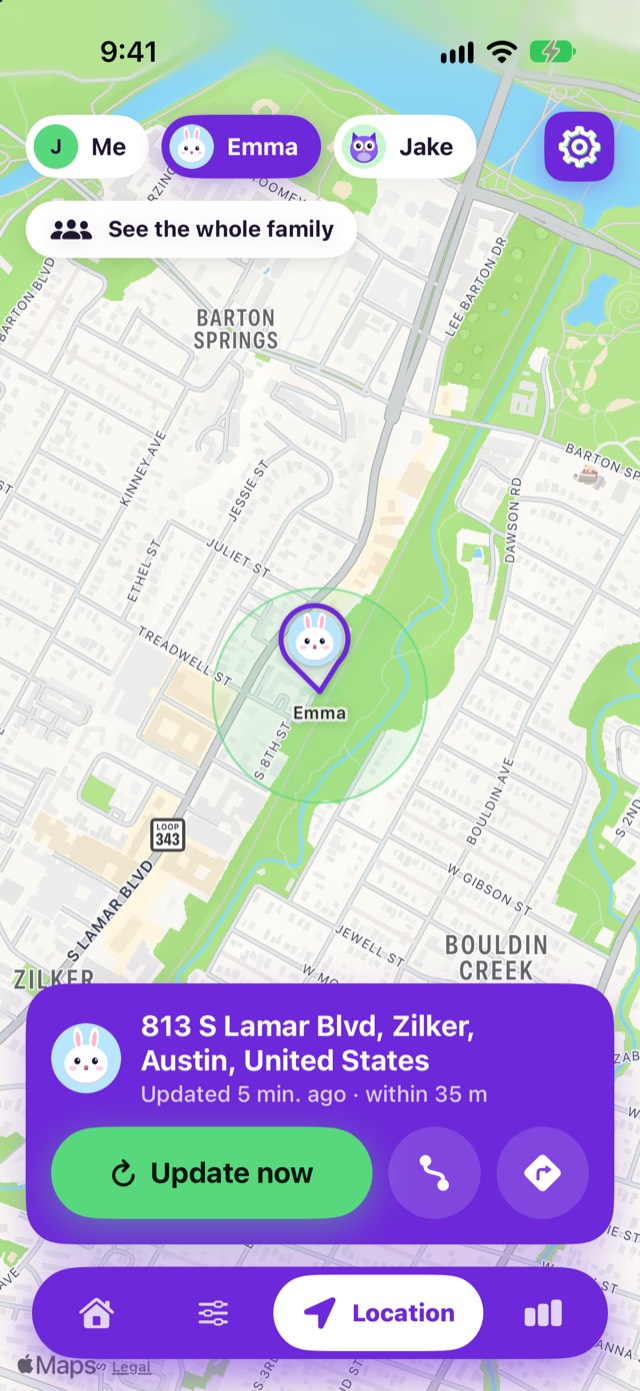
See the week, not just the day.
Screen time by hour, and a weekly report every Sunday.
- Busiest hour at a glance
- Compared with kids their age

Emma's screen time was 26% lower than other 8-12 year olds yesterday
Emma
8-12 year olds average
Busiest hour: 8 AM · 14m
When apps rest, minds thrive.
Calm games and a free library stay open while apps rest.
The Tale of Peter RabbitAlice's Adventures in WonderlandThe Wonderful Wizard of OzThe Jungle BookThe Velveteen RabbitBlack Beauty
Try everything free for 3 days.
Every feature, every child, no charge. Cancel before day 3 and you pay nothing.
Yearly
$4.17/month- Lock their phone in one tap
- Daily limits, bedtimes and app limits
- See where they are, any time
- Every child in your family
Monthly
$2.77/week- Lock their phone in one tap
- Daily limits, bedtimes and app limits
- See where they are, any time
- Every child in your family
Weekly
Most flexible- Lock their phone in one tap
- Daily limits, bedtimes and app limits
- See where they are, any time
- Every child in your family
Payment is charged to your App Store or Google Play account. Your plan renews automatically unless you cancel at least 24 hours before the period ends. Cancel any time in your account settings.
Questions parents ask
What do I need?
How do I connect my child's phone?
What can I see?
What does my child see when apps are locked?
How do I cancel?
How much does Timfy cost?
Does Timfy work on Android?
Give your family a calmer screen.
Try Timfy free for 3 days on iPhone and Android.